ضمن خدمات نظام رسوم الأراضي البيضاء والعقارات الشاغرة، توضح الجهات المختصة آلية الاستفادة من خدمة «إدارة مهلة السداد» عبر خطوات إلكترونية محددة، تتيح للمستفيدين تقديم الطلبات ومتابعتها بسهولة من خلال المنصة الرقمية المعتمدة.
خطوات خدمة إدارة مهلة السداد
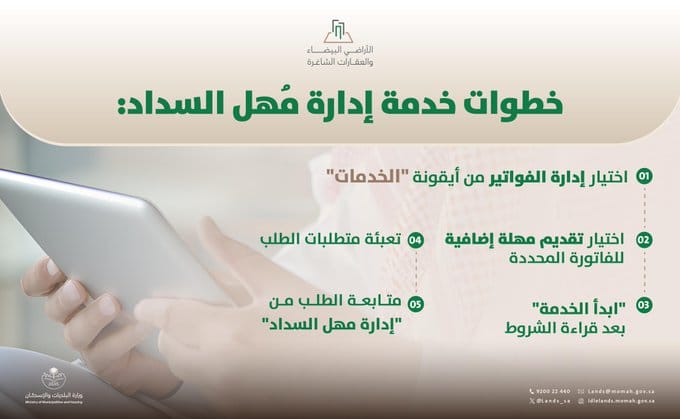
تتم عملية الاستفادة من خدمة إدارة مهلة سداد رسوم الأراضي البيضاء عبر سلسلة من الإجراءات المنظمة، تبدأ بالدخول إلى الخدمات الإلكترونية وتنتهي بمتابعة الطلب بعد تقديمه، وذلك وفق الخطوات التالية:
اختيار إدارة الفواتير
يتم الدخول إلى أيقونة «الخدمات»، ثم اختيار إدارة الفواتير لبدء الإجراءات المتعلقة بالطلب.
تقديم مهلة إضافية للفترة المحددة
اختيار خيار تقديم مهلة إضافية للفواتير الخاصة بالفترة المحددة وفق ما هو متاح في النظام.
بدء الخدمة بعد قراءة الشروط
الضغط على «ابدأ الخدمة» بعد الاطلاع على الشروط المرتبطة بالخدمة.
تعبئة متطلبات الطلب
إدخال البيانات واستكمال المتطلبات اللازمة لتقديم الطلب بشكل صحيح.
متابعة الطلب
يمكن متابعة حالة الطلب من خلال خدمة «إدارة مهلة السداد» عبر المنصة الإلكترونية.
توضح هذه الخطوات المسار الإلكتروني الكامل لتقديم طلب مهلة السداد، بما يضمن سهولة الإجراءات وإمكانية متابعة الطلبات بشكل منظم عبر القنوات الرقمية المعتمدة.