
في إطار تسهيل الإجراءات العقارية وتبسيط الخدمات الرقمية، توضح الهيئة العامة للعقار آلية تقديم طلب تقسيم أو دمج العنوان الوطني عبر منصة فرز الوحدات العقارية، من خلال خطوات منظمة تضمن دقة البيانات وسهولة المتابعة حتى اكتمال الطلب.
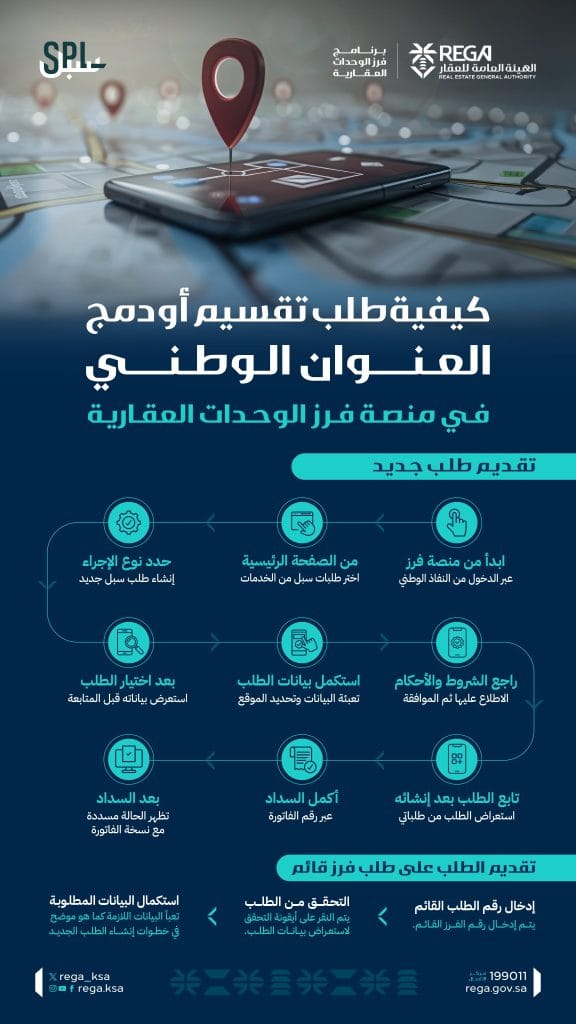
تبدأ عملية تقديم طلب تقسيم أو دمج العنوان الوطني بالدخول إلى منصة فرز عبر النفاذ الوطني، حيث يقوم المستخدم باختيار خدمات “طلبات سبل” من الصفحة الرئيسية.
بعد ذلك يتم تحديد نوع الإجراء من خلال إنشاء طلب سبل جديد، ثم استكمال بيانات الطلب عبر تعبئة المعلومات المطلوبة وتحديد الموقع بدقة. يلي ذلك مراجعة الشروط والأحكام والاطلاع عليها ثم الموافقة.
عقب الانتهاء من إدخال البيانات، يتم متابعة الطلب بعد إنشائه من خلال استعراضه ضمن قائمة الطلبات. كما تتيح المنصة إمكانية استعراض بيانات الطلب قبل المتابعة بعد اختياره.
في المرحلة التالية، يتم إكمال عملية السداد باستخدام رقم الفاتورة، وبعد السداد تظهر حالة الطلب كمسددة مع إمكانية الاطلاع على نسخة الفاتورة.
كما تتيح الخدمة تقديم طلب على فرز قائم، وذلك من خلال إدخال رقم الطلب القائم، ثم التحقق من الطلب عبر أيقونة التحقق لاستعراض البيانات، وأخيرًا استكمال البيانات المطلوبة وفق الخطوات الموضحة لإنشاء الطلب الجديد.