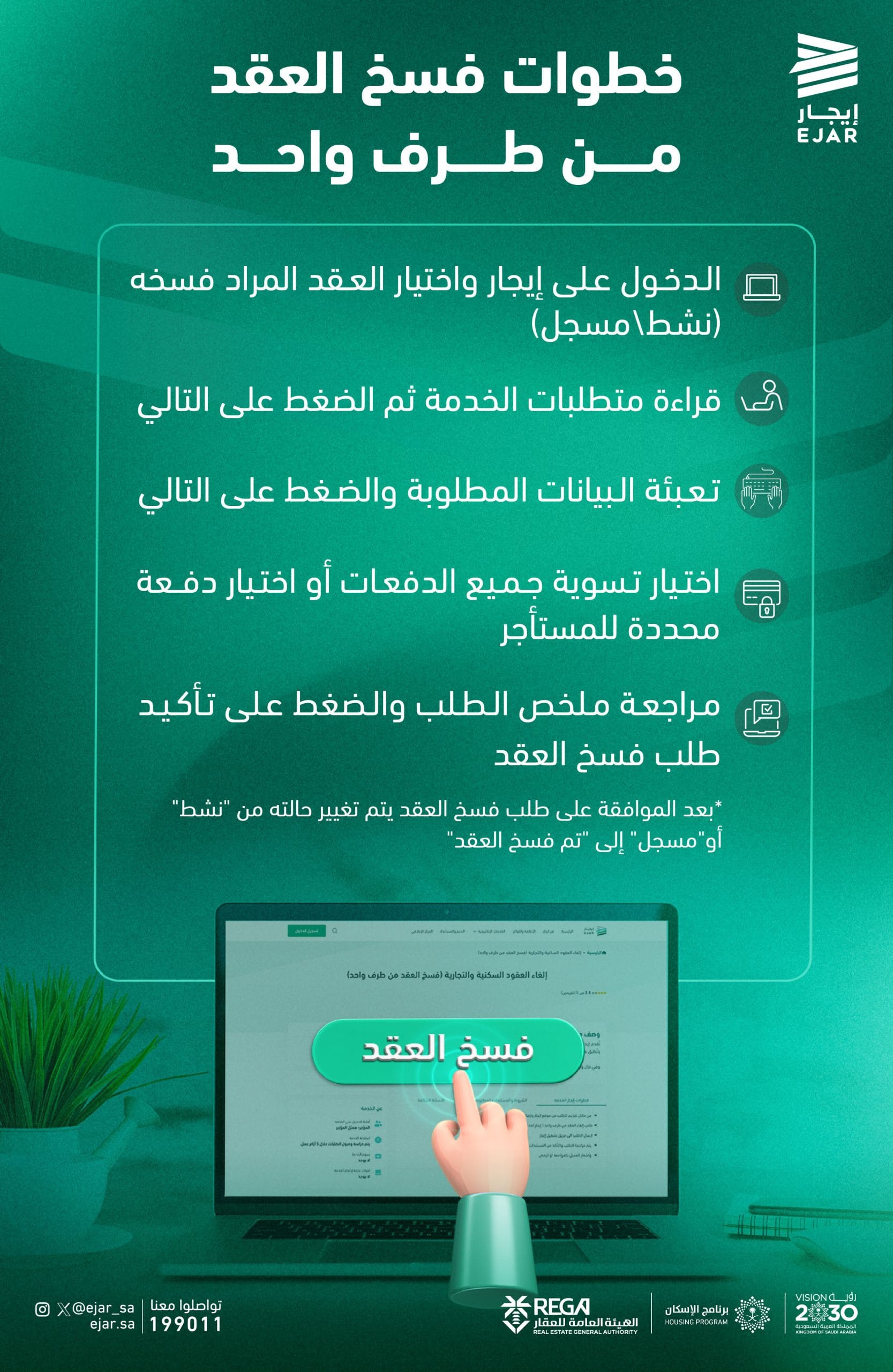
How do you unilaterally terminate a lease? The online rental services platform "Ejar” has outlined the steps for using the “Unilateral Contract Termination,” which allows for the easy and convenient termination of residential and commercial lease agreements without the need for complex traditional procedures or visiting various agencies.
This new service aims to simplify the process of terminating a lease electronically by one of the parties to the lease (the landlord or tenant), within a legal framework that protects rights and ensures transparency.
Steps to unilaterally terminate a lease through “Ejar”:
Log in to the “Ejar” platform and select the lease you wish to terminate (using your active or registered user account).
- Read the service requirements, then click the “Next” button.
- Fill in the required information accurately, then click “Next.”
- Select the method for settling outstanding amounts, either by paying all remaining installments or specifying a specific payment to be made to the tenant.
- Review the request summary and verify that the information is correct.
-
Click “Confirm Request” to submit the contract termination request.
As explained by the platform, once the request is approved by the relevant authority, the contract status will change from “Active” or “Registered” to “Contract Terminated.”
Building Trust and Regulating the Contractual
Relationship
This step is part of the efforts by the Ministry of Municipalities and Housing, represented by “Ejar,” to regulate the rental real estate sector, and to provide digital solutions in line with the Kingdom’s Vision 2030, which focuses on improving quality of life and enhancing the ease of doing business.
The new service is an important tool in enabling the parties to the contract to exercise their legal rights in a flexible and secure manner, while also helping to reduce disputes and bring stability to the rental market.
"Ejar" allows users to communicate and submit inquiries through its official channels, whether via its account on the "X" platform (@ejar_sa), through its website ejar.sa, or by calling the toll-free number 199011, thereby enhancing the user experience and ensuring the service runs smoothly.