في إطار سعي وزارة البلديات والإسكان إلى تعزيز الشفافية وتسهيل الإجراءات على ملاك الأراضي، أتاح برنامج رسوم الأراضي البيضاء خدمة التسجيل الإلكتروني عبر بوابته الموحدة. وتُمكّن هذه الخدمة الملاك من تسجيل أراضيهم بكل يسر وسهولة، سواء من خلال الصكوك الإلكترونية المرتبطة بالجهات الرسمية أو عبر إدخال بيانات الصكوك اليدوية.
وتأتي هذه الخطوة ضمن جهود الوزارة لتفعيل نظام رسوم الأراضي البيضاء، بما يساهم في تطوير القطاع العقاري، وزيادة المعروض من الأراضي المطورة داخل النطاقات العمرانية، والحد من الممارسات التي تعيق التنمية الحضرية.
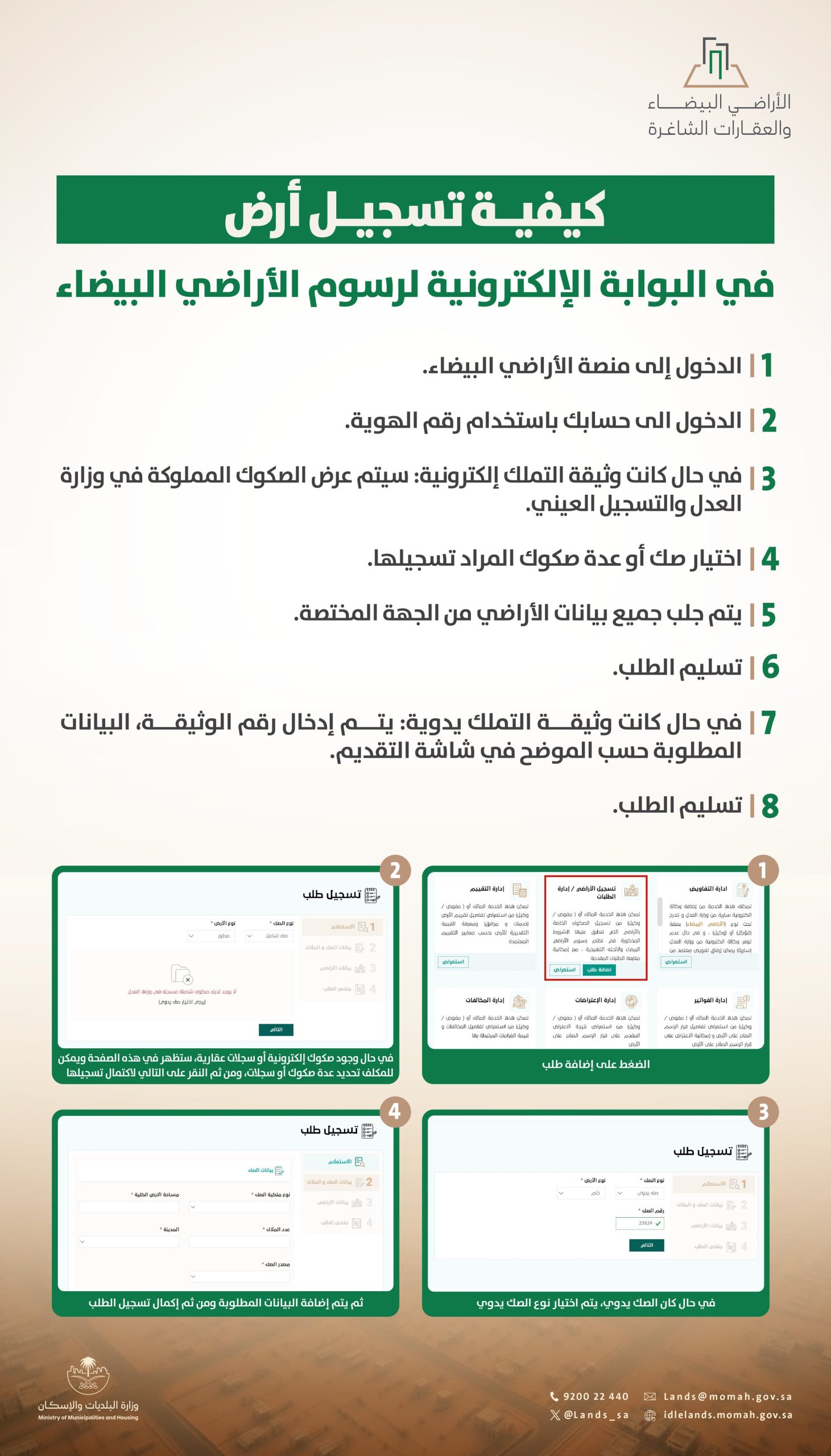
خطوات تسجيل الأرض إلكترونيًا في بوابة الأراضي البيضاء
1. الدخول إلى منصة الأراضي البيضاء.
2. تسجيل الدخول باستخدام رقم الهوية.
3. في حال كانت وثيقة التملك إلكترونية، ستُعرض الصكوك المسجلة بوزارة العدل للتسجيل المباشر.
4. اختيار صك واحد أو عدة صكوك يرغب المالك في تسجيلها.
5. جلب بيانات الأراضي تلقائيًا من الجهة المختصة.
6. تسليم الطلب إلكترونيًا.
7. في حال كانت وثيقة التملك ورقية، يتم إدخال رقم الوثيقة والبيانات المطلوبة يدويًا.
8. تسليم الطلب بعد استكمال البيانات.
دعم تقني وخدمة متكاملة
يوضح البرنامج أن النظام يوفر واجهة سهلة الاستخدام، حيث تظهر الصكوك الإلكترونية للمكلف بشكل تلقائي، كما يتيح تحديد عدة صكوك في آن واحد. أما في حال الملكية اليدوية، فيمكن استكمال عملية التسجيل بإدخال البيانات يدويًا وفق التعليمات المعروضة على المنصة.