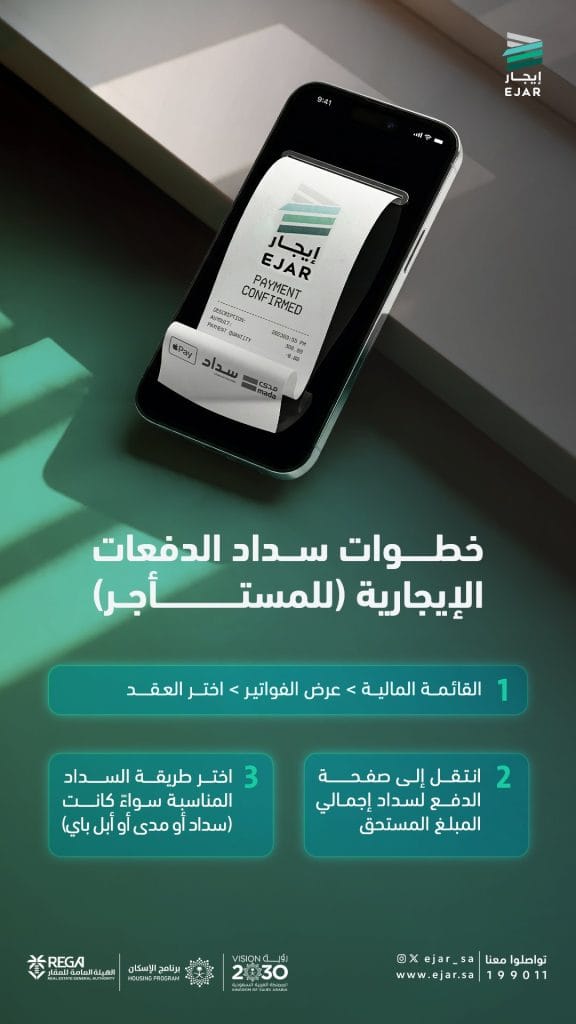

The Ejar platform explained the steps for tenants to pay their rental payments, through a set of simplified electronic procedures that allow the beneficiary to view invoices and pay the amounts due through the available payment methods.
According to the instructions provided, the process of paying rent begins by accessing the financial menu on the platform, then selecting “View Bills” and specifying the required contract.
After that, the beneficiary moves to the payment page to pay the total amount due, before choosing the appropriate payment method, whether through “SADAD”, “Mada”, or “Apple Pay”, according to the available options.
These steps come as part of facilitating the electronic payment of rental obligations and enhancing the ease of dealing with invoices and payments related to rental contracts.
Payment steps in brief:
Access the financial menu → View invoices → Select the contract.
Proceed to the payment page to pay the total amount due.
Choose the appropriate payment method, whether it's Sadad, Mada, or Apple Pay.